

 Posts


Recently my test server RAC database crashed…with the error & when I try to start the database, I end up with the same error as I found in the logs…
rac1-> srvctl start instance -d devdb -i devdb1
PRKP-1001 : Error starting instance devdb1 on node rac1
CRS-0212: Resource 'ora.devdb.devdb1.inst' is not registered.
............................................ SAME on NODE 2
rac1-> srvctl start instance -d devdb -i devdb2
PRKP-1001 : Error starting instance devdb2 on node rac2
CRS-0212: Resource 'ora.devdb.devdb2.inst' is not registered.
What i found is few of the services went down which includes gsd of the newly added node.
rac1-> crs_stat -t
Name Type Target State Host
------------------------------------------------------------
ora.devdb.db application ONLINE OFFLINE
ora....b1.inst application ONLINE OFFLINE
ora....b2.inst application ONLINE OFFLINE
ora....b3.inst application ONLINE OFFLINE
ora....SM1.asm application ONLINE ONLINE rac1
ora....C1.lsnr application ONLINE ONLINE rac1
ora.rac1.gsd application ONLINE ONLINE rac1
ora.rac1.ons application ONLINE ONLINE rac1
ora.rac1.vip application ONLINE ONLINE rac1
ora....SM2.asm application ONLINE ONLINE rac2
ora....C2.lsnr application ONLINE ONLINE rac2
ora.rac2.gsd application ONLINE ONLINE rac2
ora.rac2.ons application ONLINE ONLINE rac2
ora.rac2.vip application ONLINE ONLINE rac2
ora....SM3.asm application ONLINE ONLINE rac3
ora....C3.lsnr application ONLINE ONLINE rac3
ora.rac3.gsd application ONLINE OFFLINE
ora.rac3.ons application ONLINE ONLINE rac3
ora.rac3.vip application ONLINE ONLINE rac3
------------------------------------------------------
>> I shutdown the newly added node (RAC3)...to try to resolve the Issue.
rac1-> crs_stat -t
Name Type Target State Host
------------------------------------------------------------
ora.devdb.db application ONLINE OFFLINE
ora....b1.inst application ONLINE OFFLINE
ora....b2.inst application ONLINE OFFLINE
ora....b3.inst application ONLINE OFFLINE
ora....SM1.asm application ONLINE ONLINE rac1
ora....C1.lsnr application ONLINE ONLINE rac1
ora.rac1.gsd application ONLINE ONLINE rac1
ora.rac1.ons application ONLINE ONLINE rac1
ora.rac1.vip application ONLINE ONLINE rac1
ora....SM2.asm application ONLINE ONLINE rac2
ora....C2.lsnr application ONLINE ONLINE rac2
ora.rac2.gsd application ONLINE ONLINE rac2
ora.rac2.ons application ONLINE ONLINE rac2
ora.rac2.vip application ONLINE ONLINE rac2
ora....SM3.asm application ONLINE OFFLINE
ora....C3.lsnr application ONLINE OFFLINE
ora.rac3.gsd application ONLINE OFFLINE
ora.rac3.ons application ONLINE OFFLINE
ora.rac3.vip application ONLINE ONLINE rac1
# Can you see the VIP running on RAC1 as the node 3 is not available...any more
rac1-> srvctl status instance -d devdb -i devdb1
Instance devdb1 is not running on node rac1
rac1-> crsctl check crs
CSS appears healthy
CRS appears healthy
EVM appears healthy
*** Actual error Message
rac1-> srvctl start database -d devdb
PRKP-1001 : Error starting instance devdb1 on node rac1
CRS-0212: Resource 'ora.devdb.devdb1.inst' is not registered.
PRKP-1001 : Error starting instance devdb2 on node rac2
CRS-0212: Resource 'ora.devdb.devdb2.inst' is not registered.
PRKP-1001 : Error starting instance devdb3 on node rac3
CRS-0232: Cluster member is down. Cannot perform operation.
# Rebooted the Node 3 (RAC3)
rac1-> srvctl start instance -d devdb -i devdb1
PRKP-1001 : Error starting instance devdb1 on node rac1
CRS-0212: Resource 'ora.devdb.devdb1.inst' is not registered.
rac1-> srvctl start instance -d devdb -i devdb2
PRKP-1001 : Error starting instance devdb2 on node rac2
CRS-0212: Resource 'ora.devdb.devdb2.inst' is not registered.
rac1-> crs_stat -t
Name Type Target State Host
------------------------------------------------------------
ora.devdb.db application ONLINE OFFLINE
ora....b1.inst application ONLINE OFFLINE
ora....b2.inst application ONLINE OFFLINE
ora....b3.inst application ONLINE OFFLINE
ora....SM1.asm application ONLINE ONLINE rac1
ora....C1.lsnr application ONLINE ONLINE rac1
ora.rac1.gsd application ONLINE ONLINE rac1
ora.rac1.ons application ONLINE ONLINE rac1
ora.rac1.vip application ONLINE ONLINE rac1
ora....SM2.asm application ONLINE ONLINE rac2
ora....C2.lsnr application ONLINE ONLINE rac2
ora.rac2.gsd application ONLINE ONLINE rac2
ora.rac2.ons application ONLINE ONLINE rac2
ora.rac2.vip application ONLINE ONLINE rac2
ora....SM3.asm application ONLINE ONLINE rac3
ora....C3.lsnr application ONLINE ONLINE rac3
ora.rac3.gsd application ONLINE OFFLINE
ora.rac3.ons application ONLINE ONLINE rac3
ora.rac3.vip application ONLINE ONLINE rac3
# So with the resource issue, i removed the database and then added it in the below
way...which made it work
rac1-> srvctl remove database -d devdb
Remove the database devdb? (y/[n]) y
........................................................
rac1-> srvctl add database -d devdb -o $ORACLE_HOME
rac1-> srvctl add instance -d devdb -i devdb1 -n rac1
rac1-> srvctl add instance -d devdb -i devdb2 -n rac2
rac1-> srvctl add instance -d devdb -i devdb3 -n rac3
rac1-> crs_stat -t
Name Type Target State Host
------------------------------------------------------------
ora.devdb.db application OFFLINE OFFLINE
ora....b1.inst application OFFLINE OFFLINE
ora....b2.inst application OFFLINE OFFLINE
ora....b3.inst application OFFLINE OFFLINE
ora....SM1.asm application ONLINE ONLINE rac1
ora....C1.lsnr application ONLINE ONLINE rac1
ora.rac1.gsd application ONLINE ONLINE rac1
ora.rac1.ons application ONLINE ONLINE rac1
ora.rac1.vip application ONLINE ONLINE rac1
ora....SM2.asm application ONLINE ONLINE rac2
ora....C2.lsnr application ONLINE ONLINE rac2
ora.rac2.gsd application ONLINE ONLINE rac2
ora.rac2.ons application ONLINE ONLINE rac2
ora.rac2.vip application ONLINE ONLINE rac2
ora....SM3.asm application ONLINE ONLINE rac3
ora....C3.lsnr application ONLINE ONLINE rac3
ora.rac3.gsd application ONLINE ONLINE rac3
ora.rac3.ons application ONLINE ONLINE rac3
ora.rac3.vip application ONLINE ONLINE rac3
rac1-> srvctl start database -d devdb
rac1-> crs_stat -t
Name Type Target State Host
------------------------------------------------------------
ora.devdb.db application ONLINE ONLINE rac1
ora....b1.inst application ONLINE ONLINE rac1
ora....b2.inst application ONLINE ONLINE rac2
ora....b3.inst application ONLINE ONLINE rac3
ora....SM1.asm application ONLINE ONLINE rac1
ora....C1.lsnr application ONLINE ONLINE rac1
ora.rac1.gsd application ONLINE ONLINE rac1
ora.rac1.ons application ONLINE ONLINE rac1
ora.rac1.vip application ONLINE ONLINE rac1
ora....SM2.asm application ONLINE ONLINE rac2
ora....C2.lsnr application ONLINE ONLINE rac2
ora.rac2.gsd application ONLINE ONLINE rac2
ora.rac2.ons application ONLINE ONLINE rac2
ora.rac2.vip application ONLINE ONLINE rac2
ora....SM3.asm application ONLINE ONLINE rac3
ora....C3.lsnr application ONLINE ONLINE rac3
ora.rac3.gsd application ONLINE ONLINE rac3
ora.rac3.ons application ONLINE ONLINE rac3
ora.rac3.vip application ONLINE ONLINE rac3
rac1->
# Well i am updating the Notes for this & i will update this as soon as possible.

Custom Search
Thursday, January 17, 2008


Saturday, January 12, 2008
Microsoft Loopback Adapter
http://download.oracle.com/docs/cd/B19306_01/install.102/b14316/reqs.htm#BABGCEAI
Notes from Oracle Documentation.
To install a loopback adapter on Windows 2003 or Windows XP:
1. Open the Windows Control Panel.
2. Double-click Add Hardware to start the Add Hardware wizard.
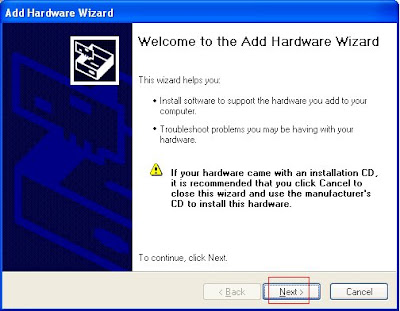
3. In the Welcome window, click Next.
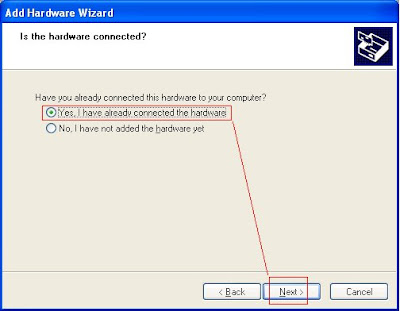
 4. In the Is the hardware connected? window, select Yes, I have already connected the hardware, and click Next.
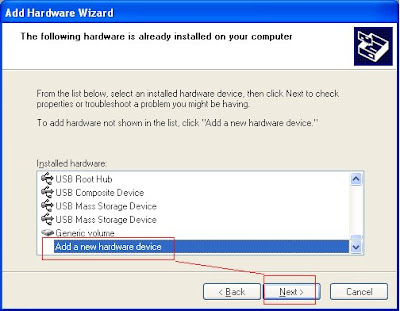
 5. In the The following hardware is already installed on your computer window, in the list of installed hardware, select Add a new hardware device, and click Next.
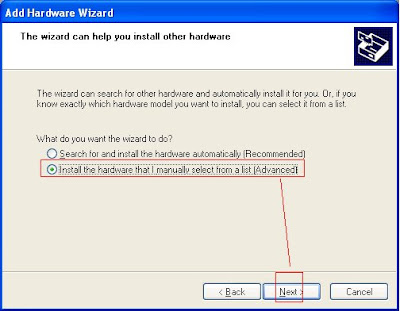
 6. In the The wizard can help you install other hardware window, select Install the hardware that I manually select from a list, and click Next
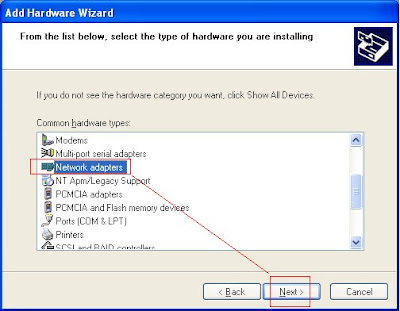
 7. From the list of hardware types, select the type of hardware you are installing window, select Network adapters, and click Next.
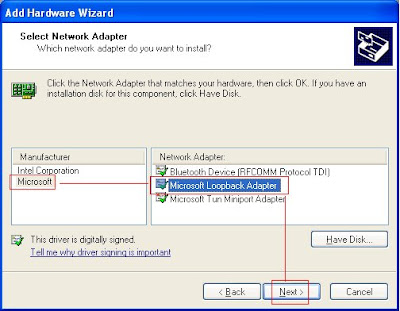
 8. In the Select Network Adapter window, make the following selections:
Manufacturer: Select Microsoft.
Network Adapter: Select Microsoft Loopback Adapter.
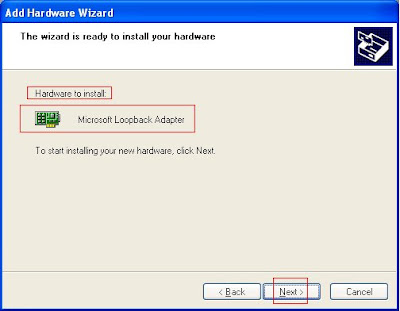
9. In the The wizard is ready to install your hardware window, click Next.
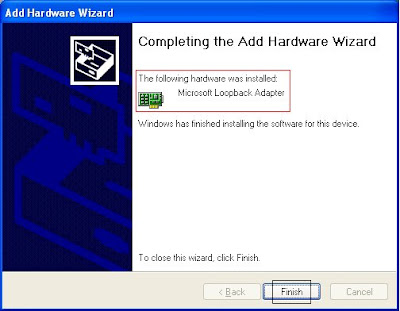
 10. In the Completing the Add Hardware Wizard window, click Finish.
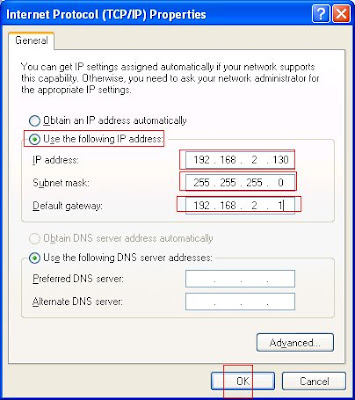
 11. In the Properties dialog box, click Use the following IP address and do the following:
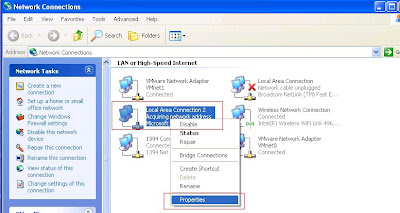 12. Enter the IP Address (192.168.2.130)
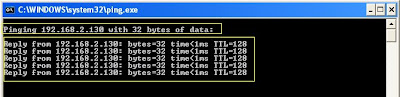
 13. You can check with PING utility.
 And done, you have your LOOP back adapter working, its more useful if you are using a computer/workstation or a LAPTOP with DHCP or wireless.
Notes from Oracle Documentation.
To install a loopback adapter on Windows 2003 or Windows XP:
1. Open the Windows Control Panel.
2. Double-click Add Hardware to start the Add Hardware wizard.
3. In the Welcome window, click Next.
 4. In the Is the hardware connected? window, select Yes, I have already connected the hardware, and click Next.
 5. In the The following hardware is already installed on your computer window, in the list of installed hardware, select Add a new hardware device, and click Next.
 6. In the The wizard can help you install other hardware window, select Install the hardware that I manually select from a list, and click Next
 7. From the list of hardware types, select the type of hardware you are installing window, select Network adapters, and click Next.
 8. In the Select Network Adapter window, make the following selections:
Manufacturer: Select Microsoft.
Network Adapter: Select Microsoft Loopback Adapter.

9. In the The wizard is ready to install your hardware window, click Next.
 10. In the Completing the Add Hardware Wizard window, click Finish.
 11. In the Properties dialog box, click Use the following IP address and do the following:
 12. Enter the IP Address (192.168.2.130)
Subnet Mast (255.255.255.0)
Default Gateway (192.168.2.1) -> Click OK
 13. You can check with PING utility.
 And done, you have your LOOP back adapter working, its more useful if you are using a computer/workstation or a LAPTOP with DHCP or wireless.
Wednesday, January 09, 2008
Wednesday, December 05, 2007
RMAN :: Clone Database to UAT - FTP to a different location
RMAN: Database Clone/Refresh from Production Server to a UAT/Development Server. Test case: (RMAN BACKUP LOCATION is not the same as of the Production).
1. Production Server
oracledb1-> tail -3 /etc/oratab
dgtest:/u01/app/oracle/product/10.2.0/db_1:Y
dataware:/u01/app/oracle/product/10.2.0/db_1:Y
oracledb1->
2. UAT Server (Target Server to clone the database)
oracledb2-> tail -3 /etc/oratab
# Multiple entries with the same $ORACLE_SID are not allowed.
oracledb2->
You can see the Server is clean.
We are now going to restore & recover a Database with SID “Dataware” to on the UAT server.
3. Make sure that you have exact file system and mount points available on the Target server.
I am going to create the directory structure for BACKGROUND Dump locations and for Database file System exactly as in the Production server. In fact in most case’s the environment will be same.
 oracledb1-> pwd
/u01/app/oracle/admin/dataware
oracledb1-> ls -ltr
total 88
drwxr-x--- 2 oracle oinstall 4096 Jul 21 13:39 dpdump
drwxr-x--- 2 oracle oinstall 4096 Jul 21 13:39 cdump
drwxr-x--- 2 oracle oinstall 4096 Jul 21 13:44 pfile
drwxr-x--- 2 oracle oinstall 4096 Nov 24 12:32 udump
drwxr-x--- 2 oracle oinstall 36864 Nov 24 12:33 bdump
drwxr-x--- 2 oracle oinstall 12288 Nov 24 12:34 adump
oracledb1->
********************************************************
oracledb2-> mkdir dataware
oracledb2-> cd dataware
oracledb2-> mkdir dpdump cdump pfile udump bdump adump
oracledb2-> ls -ltr
total 48
drwxr-xr-x 2 oracle oinstall 4096 Dec 5 13:04 udump
drwxr-xr-x 2 oracle oinstall 4096 Dec 5 13:04 pfile
drwxr-xr-x 2 oracle oinstall 4096 Dec 5 13:04 dpdump
drwxr-xr-x 2 oracle oinstall 4096 Dec 5 13:04 cdump
drwxr-xr-x 2 oracle oinstall 4096 Dec 5 13:04 bdump
drwxr-xr-x 2 oracle oinstall 4096 Dec 5 13:04 adump
oracledb2-> pwd
/u01/app/oracle/admin/dataware
**********************************************************
oracledb2-> pwd
/oradata/dataware
oracledb2-> ls -ltr
total 8
drwxr-xr-x 2 oracle oinstall 4096 Dec 5 13:09 arch
oracledb2->
*** If the database as a Flash Recovery area enable make sure that you care the directory for that as well.
*********************************************
4. On the Production Database create pfile from spfile, where we are going to have a copy of that.
SQL> !hostname
oracledb1.mycorpdomain.com
SQL> create pfile='/oradata/backup/initdataware.ora' from spfile;
File created.
SQL> !ls -ltr /oradata/backup/
total 8
-rw-r--r-- 1 oracle oinstall 1143 Dec 5 13:03 initdataware.ora
***********
Connect to the Production database with RMAN,
oracledb1-> rman target /
Recovery Manager: Release 10.2.0.3.0 - Production on Fri Dec 5 13:05:47 2007
Copyright (c) 1982, 2005, Oracle. All rights reserved.
connected to target database: DATAWARE (DBID=197345076)
RMAN>
RMAN configuration parameters are:
CONFIGURE RETENTION POLICY TO REDUNDANCY 1; # default
CONFIGURE CONTROLFILE AUTOBACKUP FORMAT FOR DEVICE TYPE DISK TO '/oradata/backup/dataware/%F';
CONFIGURE DEVICE TYPE DISK PARALLELISM 1 BACKUP TYPE TO BACKUPSET; # default
CONFIGURE CHANNEL DEVICE TYPE DISK FORMAT '/oradata/backup/dataware/%U';
CONFIGURE ENCRYPTION ALGORITHM 'AES128'; # default
CONFIGURE SNAPSHOT CONTROLFILE NAME TO '/oradata/backup/dataware/snapcf_dataware.f';
RMAN> backup database plus archivelog;
Starting backup at 05-DEC-07
current log archived
allocated channel: ORA_DISK_1
channel ORA_DISK_1: sid=143 devtype=DISK
channel ORA_DISK_1: starting archive log backupset
channel ORA_DISK_1: specifying archive log(s) in backup set
input archive log thread=1 sequence=56 recid=54 stamp=670070919
piece handle=/oradata/backup/dataware/0sk1ga0l_1_1 tag=TAG20071205T131604 comment=NONE
channel ORA_DISK_1: backup set complete, elapsed time: 00:01:35
Finished backup at 05-DEC-07
Starting backup at 05-DEC-07
current log archived
using channel ORA_DISK_1
piece handle=/oradata/backup/dataware/0tk1ga3l_1_1 tag=TAG20071205T131741 comment=NONE
channel ORA_DISK_1: backup set complete, elapsed time: 00:00:03
Finished backup at 05-DEC-07
Starting Control File and SPFILE Autobackup at 05-DEC-07
piece handle=/oradata/backup/dataware/c-197345076-20071205-00 comment=NONE
Finished Control File and SPFILE Autobackup at 05-DEC-07
5. We have a backup of the Production Database; we are now going to FTP this to the UAT / Development Site. In fact when we do the refresh or clone, we use Tapes to restore the previous Images of the backup’s. As this is just a Test scenario I am not worried about the additional load on the Network and of course taking backup at odd times.
oracledb1-> sftp 192.168.2.135
Connecting to 192.168.2.135...
oracle@192.168.2.135's password:
Permission denied, please try again.
oracle@192.168.2.135's password:
sftp> pwd
Remote working directory: /oradata/rman/dataware
6. Login to the UAT server and copy the init parameter file to ORACLE_HOME/dbs location.
oracledb2-> cp -p initdataware.ora $ORACLE_HOME/dbs/
7. Startup the Database in nomount Stage to perform the Control file Restore
oracledb2-> export ORACLE_SID=dataware
oracledb2-> rman target /
Recovery Manager: Release 10.2.0.3.0 - Production on Fri Dec 5 14:02:14 2007
Copyright (c) 1982, 2005, Oracle. All rights reserved.
connected to target database (not started)
RMAN> startup nomount;
Oracle instance started
Total System Global Area 184549376 bytes
Fixed Size 1260792 bytes
Variable Size 159384328 bytes
Database Buffers 20971520 bytes
Redo Buffers 2932736 bytes
RMAN> restore controlfile from
2> '/oradata/rman/dataware/snapcf_dataware.f';
Starting restore at 05-DEC-07
allocated channel: ORA_DISK_1
channel ORA_DISK_1: sid=156 devtype=DISK
channel ORA_DISK_1: copied control file copy
output filename=/oradata/dataware/control01.ctl
Finished restore at 05-DEC-07
8. Mount the Database and restore all the archive log files to start the Recovery of the Database at UAT.
RMAN> alter database mount;
database mounted
released channel: ORA_DISK_1
*** Recovering all the archivelog files....
RMAN> restore archivelog all;
Starting restore at 05-DEC-07
allocated channel: ORA_DISK_1
channel ORA_DISK_1: sid=156 devtype=DISK
RMAN-00571: ===========================================================
RMAN-00569: =============== ERROR MESSAGE STACK FOLLOWS ===============
RMAN-00571: ===========================================================
RMAN-03002: failure of restore command at 12/05/2007 14:06:30
RMAN-06026: some targets not found - aborting restore
RMAN-06025: no backup of log thread 1 seq 36 lowscn 866178 found to restore
WHY THE ABOVE ERROR? # This is what the problem I faced...
RMAN> show all;
RMAN configuration parameters are:
CONFIGURE CONTROLFILE AUTOBACKUP FORMAT FOR DEVICE TYPE DISK TO '/oradata/backup/dataware/%F'; ## See its poiting to a different mount point
CONFIGURE ARCHIVELOG BACKUP COPIES FOR DEVICE TYPE DISK TO 1; # default
CONFIGURE CHANNEL DEVICE TYPE DISK FORMAT '/oradata/backup/dataware/%U';
CONFIGURE MAXSETSIZE TO UNLIMITED; # default
CONFIGURE SNAPSHOT CONTROLFILE NAME TO '/u01/app/oracle/product/10.2.0/db_1/dbs/snapcf_dataware.f'; # default
*** So i changed the mount points on the UAT Server...will this work?
RMAN> CONFIGURE CONTROLFILE AUTOBACKUP FORMAT FOR DEVICE TYPE DISK TO '/oradata/rman/dataware/%F';
old RMAN configuration parameters:
CONFIGURE CONTROLFILE AUTOBACKUP FORMAT FOR DEVICE TYPE DISK TO '/oradata/backup/dataware/%F';
new RMAN configuration parameters:
CONFIGURE CONTROLFILE AUTOBACKUP FORMAT FOR DEVICE TYPE DISK TO '/oradata/rman/dataware/%F';
new RMAN configuration parameters are successfully stored
RMAN> CONFIGURE CHANNEL DEVICE TYPE DISK FORMAT '/oradata/rman/dataware/%U';
old RMAN configuration parameters:
CONFIGURE CHANNEL DEVICE TYPE DISK FORMAT '/oradata/backup/dataware/%U';
new RMAN configuration parameters:
CONFIGURE CHANNEL DEVICE TYPE DISK FORMAT '/oradata/rman/dataware/%U';
new RMAN configuration parameters are successfully stored
released channel: ORA_DISK_1
*********
RMAN> restore archivelog all from
2> '/oradata/rman/dataware/0sk1ga0l_1_1';
Starting restore at 05-DEC-07
using channel ORA_DISK_1
RMAN-00571: ===========================================================
RMAN-00569: =============== ERROR MESSAGE STACK FOLLOWS ===============
RMAN-00571: ===========================================================
RMAN-03002: failure of restore command at 12/05/2007 14:20:40
RMAN-06509: only SPFILE or control file can be restored from autobackup
No...
Why it’s happening like this?
and...
RMAN> list backup;
List of Backup Sets
===================
BS Key Type LV Size Device Type Elapsed Time Completion Time
------- ---- -- ---------- ----------- ------------ ---------------
27 Full 782.38M DISK 00:01:26 05-DEC-07
BP Key: 25 Status: AVAILABLE Compressed: NO Tag: TAG20071205T131604
Piece Name: /oradata/backup/dataware/0sk1ga0l_1_1
List of Datafiles in backup set 27
File LV Type Ckp SCN Ckp Time Name
---- -- ---- ---------- --------- ----
1 Full 1486233 05-DEC-07 /oradata/dataware/system01.dbf
3 Full 1486233 05-DEC-07 /oradata/dataware/sysaux01.dbf
8 Full 1486233 05-DEC-07 /oradata/dataware/students.dbf
and what i found is the control file which we restored before as cataloged with different backup tag and sets with different backup locations.
So we need to catalog the newly moved (FTP Location) files.
RMAN> catalog backuppiece '/oradata/rman/dataware/0rk1g9vo_1_1';
cataloged backuppiece
backup piece handle=/oradata/rman/dataware/0rk1g9vo_1_1 recid=27 stamp=672675911
RMAN> catalog backuppiece '/oradata/rman/dataware/0sk1ga0l_1_1';
cataloged backuppiece
backup piece handle=/oradata/rman/dataware/0sk1ga0l_1_1 recid=28 stamp=672675927
RMAN> catalog backuppiece '/oradata/rman/dataware/0tk1ga3l_1_1';
cataloged backuppiece
backup piece handle=/oradata/rman/dataware/0tk1ga3l_1_1 recid=29 stamp=672675936
RMAN> catalog backuppiece '/oradata/rman/dataware/c-197345076-20071205-00';
cataloged backuppiece
backup piece handle=/oradata/rman/dataware/c-197345076-20071205-00 recid=30 stamp=672675947
ALL SET # TO CHECK
RMAN> list backuppiece '/oradata/rman/dataware/0rk1g9vo_1_1';
List of Backup Pieces
BP Key BS Key Pc# Cp# Status Device Type Piece Name
------- ------- --- --- ----------- ----------- ----------
27 26 1 2 AVAILABLE DISK /oradata/rman/dataware/0rk1g9vo_1_1
RMAN> run {
2> set until sequence 88 thread 1;
3> restore database;
4> recover database;
5> sql 'alter database open resetlogs';
6> }
executing command: SET until clause
Starting restore at 05-DEC-07
using channel ORA_DISK_1
channel ORA_DISK_1: starting datafile backupset restore
channel ORA_DISK_1: specifying datafile(s) to restore from backup set
restoring datafile 00001 to /oradata/dataware/system01.dbf
restoring datafile 00007 to /oradata/dataware/tsa01.dbf
restoring datafile 00007 to /oradata/dataware/students.dbf
channel ORA_DISK_1: reading from backup piece /oradata/rman/dataware/10k1gffk_1_1
channel ORA_DISK_1: restored backup piece 1
piece handle=/oradata/rman/dataware/10k1gffk_1_1 tag=TAG20071205T144924
channel ORA_DISK_1: restore complete, elapsed time: 00:01:37
Finished restore at 05-DEC-07
Starting recover at 05-DEC-07
using channel ORA_DISK_1
starting media recovery
channel ORA_DISK_1: starting archive log restore to default destination
channel ORA_DISK_1: restoring archive log
archive log thread=1 sequence=86
channel ORA_DISK_1: restoring archive log
archive log thread=1 sequence=87
channel ORA_DISK_1: reading from backup piece /oradata/rman/dataware/13k1gfkd_1_1
channel ORA_DISK_1: restored backup piece 1
piece handle=/oradata/rman/dataware/13k1gfkd_1_1 tag=TAG20071205T145156
channel ORA_DISK_1: restore complete, elapsed time: 00:00:03
archive log filename=/oradata/dataware/arch/1_86_660663669.arc thread=1 sequence=86
archive log filename=/oradata/dataware/arch/1_87_660663669.arc thread=1 sequence=87
media recovery complete, elapsed time: 00:00:02
Finished recover at 05-DEC-07
sql statement: alter database open resetlog
Any options away from this please let me know...which is more easy than this.
Reference: Oracle Document 10G RMAN :-) Always at help.
Subscribe to:
Posts (Atom)


